Tag Archives: VMware

VMware vShield PowerShell Module

A while back I was asked if we could automate some areas of vShield, VMware Security suite of products.  I was asked to do this for a demo which was to be used at VMworld, having never touched vShield before I was thrown into the world of security at the deep end.  The first thing I found on my quest was the vShield API, there is a great document by VMware which explains the vShield proprietary Web-RPC API (Based on Rest API) and all the calls you would ever need to make to work with the vShield products.

Now I had the API details I knew I could easily write some PowerShell code in the form of an advanced function to work with the API, the first piece of code I wrote was a generic function which allowed me to GET, PUT, DELETE and POST to a proprietary Web-RPC based Restful API. I know PowerShell v3 will include cmdlets for this but I didn’t want to wait or add a dependency on something which wasn’t available as yet.

Continue reading →

VM Start-up script

Back in Jan 2010 I wrote a script which shut down the virtual infrastructure, this was used to ensure your VMs were shut down and then your hosts were shut down in an orderly manner, ideal for things like UPS shutdown scripts etc.

A slight spin on that is a Start-Up script, I was asked by a couple of people if I had one of these, it also becomes more relevant with the vCenter Virtual appliance, no need for HA and DRS rules or to manually search for the vCenter Virtual Appliance if there is a power outage.

The script below will connect to all hosts you define at the start, these could obviously be read from a csv, xml file or a database etc but I just define them in a variable for ease of the script.

The script will firstly connect to each of these hosts in turn, once connected it will search for the first VMs, in my case this is a couple of domain controllers, it could be database servers or any other infrastructure servers which need to come up before vCenter.   Once these VMs have been found the script will start them and wait for their tools status to be ready, this is an easy way to check that the VM is started completely.

Once the infrastructure servers are started it will then search for your vCenter VM, this could be on any of the connected hosts, it will start it and again wait until the tools return as being completely started.

Continue reading →

Migrating ESX to ESXi

image

Just released on the VMware Flings site is a fling which is designed to help when you make the move from ESX to ESXi, this tool will help you check hardware software and also that there are no lingering scripts or locally stored VMs etc.

A great tool to download and run against your environment to ensure you have caught everything before the move to the next version of ESXi. Continue reading →

vCloud Director 1.0 PowerShell Advanced Functions

Its no secret that VMware are working on vCloud Director (vCD) cmdlets, they recently surveyed the PowerShell and VMware community to make sure they had all the information needed to make this as much of a success as the vSphere PowerCLI cmdlets.

But did you know you can already use PowerShell with vCD ?  It should be no surprise to anyone who uses PowerShell to know that PowerShell does a great job with XML manipulation and API calls.

As part of vCD 1.0 there was obviously an API, this was based on REST which is essentially calls to web pages and sending/receiving data, so with the knowledge that this API is available and that PowerShell is a great way to communicate with this API all that was left was for someone to tie all this together and create some advanced functions which can be used against the vCloud API…. enter Jake Robinson.

image

Jake has been doing some great work recently, personally I have spoken to him a couple of times and had the privilege of meeting him at VMworld 2011 Las Vegas, he is a great guy and very knowledgeable about both PowerShell and vCD so the perfect guy to create some advanced functions.

The functions can be downloaded from here:

Download: https://github.com/jakerobinson/vCloud-Powershell

I would also recommend checking out his great video on what he has created and some examples of how these can be used published here on his blog (add to your RSS feed) and also embedded below. Continue reading →

PowerCLI at VMworld Europe ‘11

I have just had a quick chat with my good friend PowerCLI-Man and he wanted me to let you know that despite rumours he will be attending VMworld Europe in Copenhagen 2011 – I for one am pleased about this and hope I will finally get the chance to meet him.

He said it was important to point out a couple of sessions to you which apparently will be fantastic:

image


Continue reading →

Automated install of vShield Services

Following on from my previous post in this series where I showed how we could deploy vShield manager into our virtual infrastructure I thought I would take it one step further and show how we can use the vShield API’s within PowerShell to make some nice PowerShell advanced functions which will install the vShield services on our hosts.

Forgetting about the functions for a moment this really does show the power of PowerShell and how we can simplify everything down into a couple of lines of code which can be used over and over.  The last line of this code is all that is now needed to install vShield services on not just 1 host but 100’s of hosts !

Watch it in action Continue reading →

ESXi 5.0 Reference Poster

During VMworld most people I talked to were either moving to ESXi or excited by the new features of vSphere 5 and were investigating what they would need to do to upgrade and get the latest and greatest.

Those who attended the Hands on Lab were lucky enough to grab a poster bought to you by VMware Technical Marketing, this year VMware were giving out two posters, the first is the “VMware Management with PowerCLI 5.0” poster which can be downloaded here.

The second was a new poster which was designed to help you  move to ESXi 5.0, this is called the “VMware ESXi 5.0 Reference” poster, it includes handy quick references to advise people of common tasks like upgrading to the latest version…

Continue reading →

Quick and simple storage vMotion scripts

Here are a couple of quick storage vMotion scripts, easy enough but they come in useful when moving to a new datastore.

They will obviously be bound by the amount of concurrent sVMotions allowed for your version of ESX, the rest will queue until others have completed.

These are handy to fire off and walk away and then check later rather than having to manually kick each one off.

Option 1

Select the VMs on a certain datastore and move them to a new datastore and change the disk format to thin along the way

Get-Datastore "CurrentDatastoreName" | Get-VM | Move-VM -DiskStorageFormat Thin -Datastore "NewDatastoreName" –RunAsync

Option 2

Import a CSV with Name, NewDatastore headings and move each one of these converting the disk along the way

Import-Csv c:\Tmp\SvMotion.csv | Foreach {
    Get-VM $_.Name | Move-VM -DiskStorageFormat Thin -Datastore $_.NewDatastore -RunAsync
}

Did they move ?

To check these have completed successfully you can use the following:

Get-VM | Select Name, @{N="Datastore";E={$_ | Get-Datastore}}

PowerShell automated install of vShield 5

I have been learning a little about vShield lately, mainly for some work I had to complete for VMworld Las Vegas but also as I started coming up with some cool stuff when using PowerShell to talk the the REST API of vShield.  More on that will come in a following post but I wanted to give just a quick idea of what was possible.

Starting from the beginning, the first thing we will need to do is install vShield 5 into your existing environment, this could be done by downloading the software and installing it manually but why would we do this ? Automation is king !

So the following PowerShell script will show you how to automate the following:

  • Install the vShield ova file into vSphere as a new VM
  • Start the vShield VM
  • Set the IP information
  • Restart the vShield VM
  • Use the vShield API to connect it to vCenter

Of course once we have done this we will need to install the vShield Agent VMs onto our hosts but that’s a great start and we need to leave some things for me to write about in future blog posts !

I would like to point out at this point that I struggled with setting the IP address on the machine, I knew I could connect to the VM using the great Invoke-VMScript cmdlet but tried several ways until I asked for help from the legend that is Mr William Lam, you can see from this post how he managed to do this.  Thanks to William I was also able to follow his method (but with less of that Perl stuff) and enable the last piece of the jigsaw.

A big thanks to Jeff Hicks who also wrote a nice easy to use function to test if your website is available, this came in useful when I was waiting for the management website to come up before I could hook into the API and connect vShield to vCenter. Continue reading →

ESXCLI and killing a stuck VM

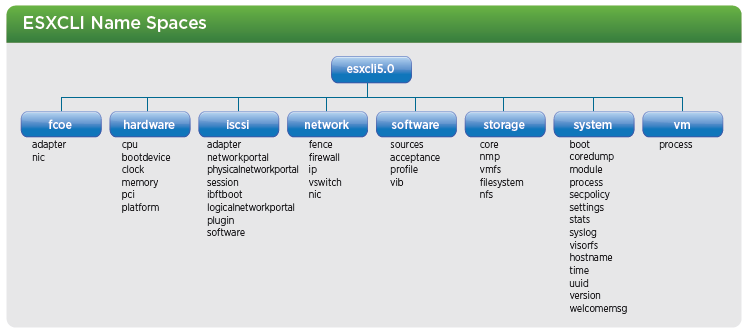
With the release of vSphere 5.0 there have been some changes to ESXCLI to bring the fragmented commands into more of a formal and discoverable structure as part of this ESXCLI has been expanded, as a reminder ESXCLI can be used from both vCLI and also in technical support mode, a high level of the new ESXCLI 5.0 name spaces as can be seen below:

image

Kill a VM with ESXCLI

As you can see from above, the structure has clearly changed from VSphere 4.1, lets take a look at an example, if we wanted to kill a stuck VM which has been documented as part of KB Article 1004340 which can be found here.

We can do this by using the following ESXCLI 5.0 example:

Continue reading →