
Recently I needed to check the vmkernel log file on a host for any errors relating to a disk issue I was having, I did this in the normal way of using putty to get to my server and then a cat /var/log/vmkernel. That is one way of doing it but did you know you could also do this through PowerCLI and add some automation into it ? Well you can….
There is a cmdlet called Get-Logtype, if we connect to a VirtualCenter and then run this you will see the following:
Get-LogType
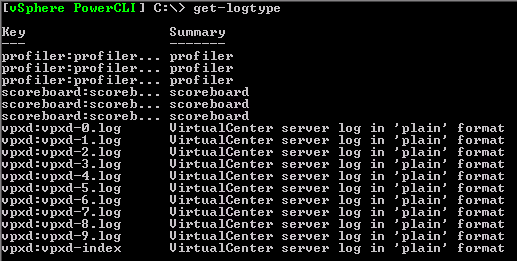
so these are the VirtualCenter log files, but what if we want to get a hosts log files, lets try this:
Get-VMHost Testesx01* |Get-LogType

That’s better now we can see the log files we are interested in, now we need to read the log file for the server, this can be done using the Get-Log cmdlet as so:
(Get-Log -VMHost (Get-VMHost testesx01*) vmkernel).Entries

That’s great but as we all know we don’t really want to get all the information from the vmkernel log file as most of it is irrelevant, what we really need are any warning messages.
This is easily achievable with the power of PowerCLI and PowerShell:
(Get-Log -VMHost (Get-VMHost testesx01*) vmkernel).Entries | Where {$_ -like “*WARNING*“}

Just one more thing that will be added as part of the next version of the Daily Report which will be posted this week.
hello all,
good useful script ….but how to pull all logs to excel sheet or text file ??
when i tried bellow method …not working
(Get-Log -VMHost (Get-VMHost 100.98.15.83) vmkernel).Entries | Export-Csv C:\pstest.csv
please help to fix
Hi Virtu, Excellent information, can you please help me in finding the old logs on ESXi host which is there in /var/run/log/ directory
This was super helpful for our troubleshooting of ESXi hosts that are supposedly reporting memory controller read errors. Thank you very much!
hi
i am seeking for script (powercli) to delete files from ESXi 5 host
Pingback: vClarified | ESXi Log Files
Pingback: از کار افتادن هفتگی Esxi 4.1
You should be able to pipe them into Out-file c:\tmp\log.txt
Al,
How can we export these logs to text or Word file? Thanks
Good day Virtu-al,
I’m a bit puzzled, we have put together several PowerCLI scripts to collects logs from the ESXi host servers, which work great; but there is one log I can’t seem to query which is a report on the Secure log. Do you have some tricks up your sleeve to remote retrieve the secure log.
Thanks.
Pingback: VMware ESXi 4 Log Files - The SLOG – SimonLong/Blog
Al, any idea whether there’s a way to query the esxupdate.log via PowerCLI?
@Mike Foley
Thanks, your right, I do have a version which now works with both, its in the latest vCheck script too.
Note that this will only work with ESX servers and not ESXi servers. ESXi servers have all the vmkernel logs rolled up into the key “messages”
If server type is ESX then key is vmkernel, else key is messages.
mike
We have configured our hosts to pipe out all logs to a syslog server that provides e-mail alerts for any messageswith warning or error priority. It works a treat, but I know it is not powershell…
Pingback: PowerCLI: Reading the VMKERNEL logfiles with Powershell v2 « ICT-Freak.nl
Pfft just ignore Carter, bullying the rest of us with skillz as usual.
Great post, you really should be working in the finance industry 😛
@Carter Shanklin
Actually your version does look a lot easier, thanks for the comment.
The technique I use is:
Get-VMHost testesx01* | Get-Log vmkernel | Select -expand Entries |
Select-String WARNING
which I find to be a lot more readable. I believe this requires PowerShell v2 for the Select -expand part to work properly.