Category Archives: PowerShell

Automated install of vShield Services

Following on from my previous post in this series where I showed how we could deploy vShield manager into our virtual infrastructure I thought I would take it one step further and show how we can use the vShield API’s within PowerShell to make some nice PowerShell advanced functions which will install the vShield services on our hosts.

Forgetting about the functions for a moment this really does show the power of PowerShell and how we can simplify everything down into a couple of lines of code which can be used over and over.  The last line of this code is all that is now needed to install vShield services on not just 1 host but 100’s of hosts !

Watch it in action Continue reading →

Image Builder and Auto Deploy Powerpack

Recently with vSphere 5 VMware enabled you to deploy the ESXi image via PXE boot to your hosts, to do this you need some PowerCLI knowledge.  Now just because I find PowerCLI easy to use and a great product it doesn’t mean the next person will.

Luckily PowerGUI gave us a great way to add an MMC style interface back on top of the cmdlets, this is called a Powerpack.

The Image Builder and Auto Deploy Powerpack is a PowerGUI Powerpack which enables us as VMware admins to have a graphical interface to Image Builder and Auto Deploy which are currently released as PowerShell snap-ins only.

The Powerpack contains a variety of scripts which will allow you to harness the power of custom ESXi images and stateless deployment.

What Do I need ?

In order to use this Powerpack you will need the following:

  • PowerShell V2
  • PowerCLI 5.0 or later version
  • PowerGUI
  • Download the Powerpack from below

Continue reading →

ESXCLI and killing a stuck VM

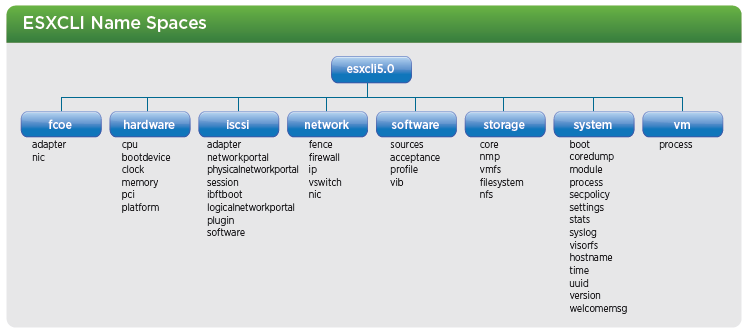
With the release of vSphere 5.0 there have been some changes to ESXCLI to bring the fragmented commands into more of a formal and discoverable structure as part of this ESXCLI has been expanded, as a reminder ESXCLI can be used from both vCLI and also in technical support mode, a high level of the new ESXCLI 5.0 name spaces as can be seen below:

image

Kill a VM with ESXCLI

As you can see from above, the structure has clearly changed from VSphere 4.1, lets take a look at an example, if we wanted to kill a stuck VM which has been documented as part of KB Article 1004340 which can be found here.

We can do this by using the following ESXCLI 5.0 example:

Continue reading →

vSphere 5 License Entitlement changes

Following my previous post VMware have just announced a change to the License entitlements to vSphere 5, I know I work for VMware and therefore my view is obviously slightly tainted but I personally think this is a good move and it proves that they do listen and value their customers opinions.

So what changes have been made ?

  1. VMware have increased vRAM entitlements for all vSphere editions.
  2. The amount of vRAM has been capped at 96GB of vRAM, so if your VMs have over this amount it will only count the first 96GB.
  3. The amount of vRAM is now calculated as a 12 month average of allocated vRAM

New Entitlements

The changes mean that the following vRAM entitlements per edition will now be granted:

vSphere edition vRAM entitlement
vSphere Enterprise Plus 96 GB
vSphere Enterprise 64 GB
vSphere Standard 32 GB
vSphere Essentials Plus 32 GB
vSphere Essentials 32 GB
Free vSphere Hypervisor 32 GB (Per Host)

Continue reading →

Update and re-composure of View Pools

I was recently asked if it was possible to automate the update of a View Pool every week after the updates had been applied to the virtual machines using Windows Update services, the process is quite straight forward.

This person needed to snapshot  a VM after the updates were completed and then use this snapshot to re-compose the pool, after this was complete they would then use this pool to make sure there were no issues.

The following script does just that, it takes the VM from a given pool and snapshots the VM, it then adds this snapshot back as the active replica for the pool, the idea is to run this as a scheduled task (maybe on Tuesday night) on the View server allowing the snapshot to be created every time it runs.

Watch it in action…

Continue reading →

Which VMs set your Slot Size ?

A previous post on my blog shows us how to get the slot size information for each cluster which has HA enabled, it also discusses what a slot size is and points to some further reading on Yellow-Bricks.

Readers of the great HA and DRS book will know exactly what a slot size is, if you are unsure then I suggest you read my previous article or the HA and DRS book, it is important information to know.

But which VMs are setting your slot size ?  This is a question which was emailed to me over a year ago, someone had issues finding the VMs which were setting their slot size and they had run out – not a good place to be.

I wrote a script for them and asked them to test it, then I completely forgot about it – until recently when the question came up again.

Now you probably think you know which VM’s are setting your slot size but the thing that struck me is that nearly all the people I asked to check this came back with the same comments:

Yep, it works and wow, I had forgotten about that machine and the resources I allocated to it !

So please, download it and give it a go, who knows you too may have a surprise.


Continue reading →

Number of Physical & Virtual CPU’s per host & Cluster

Recently I received a comment on an older post of mine which gave output of the number of virtual CPU’s on a host and also in a cluster, the comment asked if there was a way to export this to a text or html file which is easy enough in PowerShell.

After reading my code I was astounded at how bad it was, one thing i wish I had time for was to go back to some of my earlier code to tidy it up with the tips and tricks I have learnt over the last year and also amend it to use the new features provided to us by the PowerCLI team to make things easier.

One such feature is a cmdlet in the current release of PowerCLI (4.1 U1) (If your not sure what version you are running then just type Get-PowerCLIVersion at the prompt). 

The cmdlet I am referring to is New-VIProperty, this cmdlet allows us to add additional properties to the returned values from certain objects, for a detailed post on this cmdlet look at Luc’s great post here I can also highly recommend his list of New-VIProperty examples which is amazing and can be found here.

Basically this allows us to expand our returned objects from cmdlets to give us further information for an easy example if we run Get-VM we will receive a number of different default properties but what if we wanted something that wasn’t on the list of returned properties ?  Normally we would need to use a PowerShell expression to add this data when we select the data: Continue reading →

New PowerShell Tools from Sapien

Sapien have just released some great PowerShell tools, if you have not tried their tools before I suggest you head over to their site and make use of their free trials before making your mind up for yourself, i for one could not be without the form editor.

They have recently released the 2011 versions of:

Primal Script Editor

A fantastic script editor supporting over 50 languages with syntax colouring, brace matching, code folding and a large number of enhanced features, this editor has everything you need including the following features:

image

  • Comprehensive Help System
  • Multi-Platform Support
  • Integrated Console
  • PrimalSense
  • Multi-Platform Debugger
  • Script Packaging
  • Compare and Merge


Learn more and try it here: http://www.sapien.com/software/primalscript

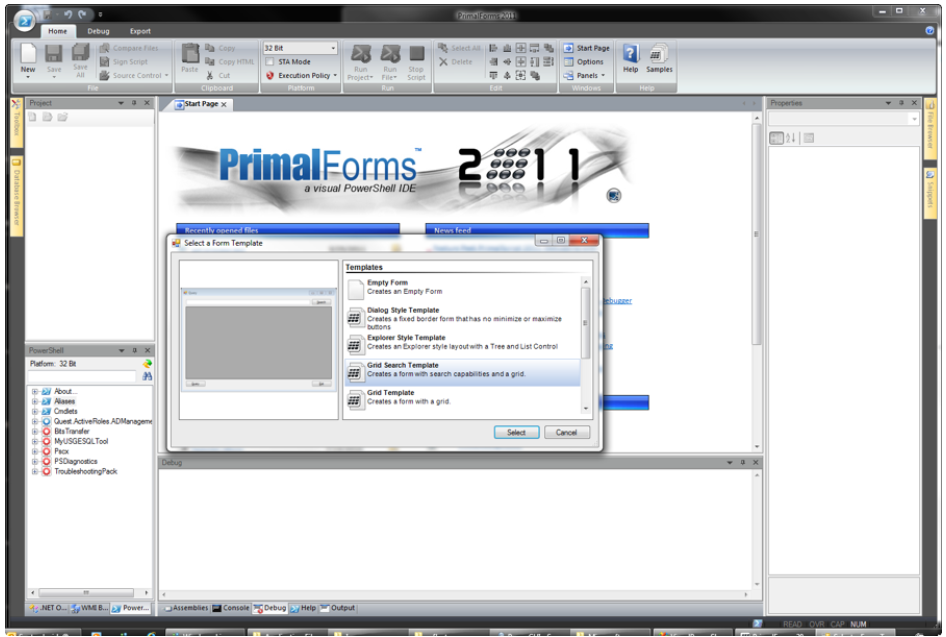
Primal Forms

An Enhanced Form Designer makes GUI design fast and easy, Eliminate the need to manually write hundreds of lines of code just drag and drop controls to make fantastic applications in seconds.

image

  • Multiplatform Support
  • PowerShell Script Editor
  • PowerShell Console
  • Script Debugger
  • Create Executables
  • Code Snippets
  • PowerShell Help


Learn more and try it here: http://www.sapien.com/software/primalforms

Using the EMC Cmdlets with PowerCLI

As you know from my previous post “EMC PowerShell Cmdlets – Where to start” I have started looking at the EMC PowerShell cmdlets, one thing I was keen to use them for was to find information on my VMware Datastores.

This information is already available if you have the EMC VSI Plugin installed as GUI based information but I wanted to be able to script against this info, pull various bits of information that I needed and output it into a Spread sheet.

Unfortunately the cmdlets as they stand do not allow you to take a VMware datastore and get the underlying LUN information straight out but what they do allow, with a bit of messing around, is the ability to link the information and pull back what we need, with a little work during my lunch break I managed to create a function to allow us to match the datastore objects with the EMC Lun information.

Wouldn’t it be cool if we had a single cmdlet or function we could pipe Get-Datastore or Get-SCSILun information straight into to retrieve the EMC Lun information  – well now we can !

Continue reading →