

Fed up of chasing those people who constantly create snapshots and leave them hanging around for weeks or even months on end ?
You no longer have to do the chasing, just use the following script to automatically find the offending snapshot, find the person who created it, get their email address from AD and send them an email reminding them of their mortal sin.
The email address is taken from the Email field as shown below:

A few requirements:
- The accounts must have the E-Mail field filled out
- The account you run the script as must have read permissions to AD (Any member of the domain should have this)
- You need to fill in the smtp server address, VI Server name and the from address at the top of this script
- You can run this as a scheduled task to constantly email the offending parties 🙂
- The below script is set to remind of anything over 2 weeks old but this can easily be amended
- Once completed the offending person will receive an email as below:
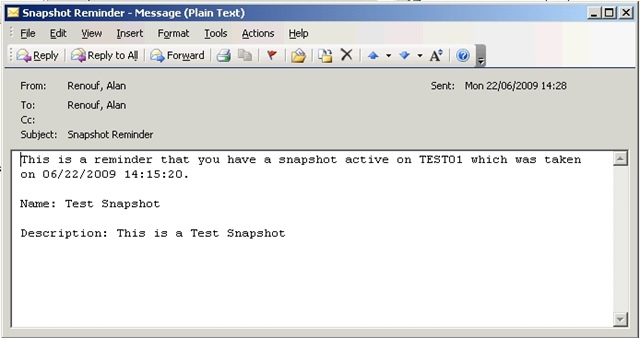
Thanks to LucD for helping with finding the user who created the snapshot on the PowerCLI Forum.
The Script:
# - SnapReminder V1.0 By Virtu-Al - http://virtu-al.net
#
# Please use the below variables to define your settings before use
#
$smtpServer = "mysmtpserver.mydomain.com"
$MailFrom = "me@mydomain.com"
$VISRV = "MYVISERVER"

function Find-User ($username){
	if ($username -ne $null)
	{
		$usr = (($username.split("\"))[1])
		$root = [ADSI]""
		$filter = ("(&(objectCategory=user)(samAccountName=$Usr))")
		$ds = new-object system.DirectoryServices.DirectorySearcher($root,$filter)
		$ds.PageSize = 1000
		$ds.FindOne()
	}
}

function Get-SnapshotTree{
	param($tree, $target)

	$found = $null
	foreach($elem in $tree){
		if($elem.Snapshot.Value -eq $target.Value){
			$found = $elem
			continue
		}
	}
	if($found -eq $null -and $elem.ChildSnapshotList -ne $null){
		$found = Get-SnapshotTree $elem.ChildSnapshotList $target
	}

	return $found
}

function Get-SnapshotExtra ($snap){
	$guestName = $snap.VM	# The name of the guest

	$tasknumber = 999		# Windowsize of the Task collector

	$taskMgr = Get-View TaskManager

	# Create hash table. Each entry is a create snapshot task
	$report = @{}

	$filter = New-Object VMware.Vim.TaskFilterSpec
	$filter.Time = New-Object VMware.Vim.TaskFilterSpecByTime
	$filter.Time.beginTime = (($snap.Created).AddSeconds(-5))
	$filter.Time.timeType = "startedTime"

	$collectionImpl = Get-View ($taskMgr.CreateCollectorForTasks($filter))

	$dummy = $collectionImpl.RewindCollector
	$collection = $collectionImpl.ReadNextTasks($tasknumber)
	while($collection -ne $null){
		$collection | where {$_.DescriptionId -eq "VirtualMachine.createSnapshot" -and $_.State -eq "success" -and $_.EntityName -eq $guestName} | %{
			$row = New-Object PsObject
			$row | Add-Member -MemberType NoteProperty -Name User -Value $_.Reason.UserName
			$vm = Get-View $_.Entity
			$snapshot = Get-SnapshotTree $vm.Snapshot.RootSnapshotList $_.Result
			$key = $_.EntityName + "&" + ($snapshot.CreateTime.ToString())
			$report[$key] = $row
		}
		$collection = $collectionImpl.ReadNextTasks($tasknumber)
	}
	$collectionImpl.DestroyCollector()

	# Get the guest's snapshots and add the user
	$snapshotsExtra = $snap | % {
		$key = $_.vm.Name + "&" + ($_.Created.ToString())
		if($report.ContainsKey($key)){
			$_ | Add-Member -MemberType NoteProperty -Name Creator -Value $report[$key].User
		}
		$_
	}
	$snapshotsExtra
}

Function SnapMail ($Mailto, $snapshot)
{
	$msg = new-object Net.Mail.MailMessage
	$smtp = new-object Net.Mail.SmtpClient($smtpServer)
	$msg.From = $MailFrom
	$msg.To.Add($Mailto)

	$msg.Subject = "Snapshot Reminder"

$MailText = @"
This is a reminder that you have a snapshot active on $($snapshot.VM) which was taken on $($snapshot.Created).

Name: $($snapshot.Name)

Description: $($snapshot.Description)
"@

	$msg.Body = $MailText
	$smtp.Send($msg)
}

Connect-VIServer $VISRV

foreach ($snap in (Get-VM | Get-Snapshot | Where {$_.Created -lt ((Get-Date).AddDays(-14))})){
	$SnapshotInfo = Get-SnapshotExtra $snap
	$mailto = ((Find-User $SnapshotInfo.Creator).Properties.mail)
	SnapMail $mailto $SnapshotInfo
}
I get the same error too 🙁
Love this script – needed to have a simple report sent to find stale VEEAM snapshots so I hacked yours down to this … works wonderfully:
–start PS Script–
$daysold = 14
$VISRV = “x.x.x.x”
$smtpServer = “x.x.x.x”
$smtpFrom = “noreply@server.local”
$smtpTo = “reports@acompany.ca”
$messageSubject = “vMWare Snapshot Report – Days old =” + $daysold
Connect-VIServer $VISRV
$messageBody = (Get-Snapshot -VM * | Where {$_.Created -lt ((Get-Date).AddDays(-$daysold))} | select VM,Created,Name | out-string )
$smtp = New-Object Net.Mail.SmtpClient($smtpServer)
$smtp.Send($smtpFrom,$smtpTo,$messagesubject,$messagebody)
–stop PS Script–
Thanks!,
– rattlerant
After this Script work really great for me for long time. I got problems after i updated the vcenter Server to 5.0
The error Ouput for the Powershell is like that.
Sie können keine Methode für einen Ausdruck mit dem Wert NULL aufrufen.
Bei C:\Program Files (x86)\VMware\Infrastructure\vSphere PowerCLI\Jobs\SnapMail.ps1:65 Zeichen:72
+ $key = $_.EntityName + “&” + ($snapshot.CreateTime.ToString <<<< ())
+ CategoryInfo : InvalidOperation: (ToString:String) [], RuntimeException
+ FullyQualifiedErrorId : InvokeMethodOnNull
Sie können keine Methode für einen Ausdruck mit dem Wert NULL aufrufen.
Bei C:\Program Files (x86)\VMware\Infrastructure\vSphere PowerCLI\Jobs\SnapMail.ps1:65 Zeichen:72
+ $key = $_.EntityName + "&" + ($snapshot.CreateTime.ToString <<<< ())
+ CategoryInfo : InvalidOperation: (ToString:String) [], RuntimeException
+ FullyQualifiedErrorId : InvokeMethodOnNull
For myself i find out that some Snapshot (not all, thats is a bit crazy for me) dont have the "Creator" Information. Not empty. The Information is not there.
May you can help me out. I use this Script that my "Users" Delete her Snapshots herself. But whitout this Script the Snapshots will be there forever.
Greetings
Christian
I found my answer in the thread on the forums (http://communities.vmware.com/thread/216723?start=15&tstart=0).
Thanks for the script!
I get the following errors when this script detects a snapshot. It looks to me like it isn’t finding the user / email address to populate into the script.
I am running the script as a domain user, and my AD email field is populated. I am using PowerCLI 5 and vSphere 5.
Any help would be appreciated.
Exception calling “Add” with “1” argument(s): “Value cannot be null.
Parameter name: item”
At D:\Scripts\SnapshotReminder.ps1:95 char:16
+ $msg.To.Add <<<< ($Mailto)
+ CategoryInfo : NotSpecified: (:) [], MethodInvocationException
+ FullyQualifiedErrorId : DotNetMethodException
Exception calling "Send" with "1" argument(s): "A recipient must be specified."
At D:\Scripts\SnapshotReminder.ps1:110 char:15
+ $smtp.Send <<<< ($msg)
+ CategoryInfo : NotSpecified: (:) [], MethodInvocationException
+ FullyQualifiedErrorId : DotNetMethodException