Tag Archives: VMware

PowerCLI Freebies

One question I have been asked more and more recently is how can people get hold of the PowerCLI Poster if they didn’t attend VMworld or one of the VMUGs where VMware and I have been giving them away.

There is of course the PDF version which can be found here but what if you are not fortunate to have a poster sized printer to get this printed at a good size to fill that hole on your wall ?

Its your lucky day !  VMware are now printing and posting these to you FREE OF CHARGE, they have put together a “PowerCLI FAN PACK” which contains the following: Continue reading →

PowerCLI 4.1.1 Poster

Recently VMware updated PowerCLI to version 4.1.1, this includes some cool updates including several new cmdlets and a few fixes behind the scenes to make things run faster and fix type names.

With the new version now comes a new poster, many of you will have already seen the PowerCLI Poster, I know thousands have already been given out at VMworld USA, VMworld Europe and also a limited edition version at the Dutch VMUG.  VMware have done a great job updating this and also asking some of the top users of PowerCLI what should also be included or changed.

If you were unlucky enough not to have one of these above your desk on the wall at the moment then it will only be a matter of time, VMware will soon be hopefully giving you the chance to get one of these posters by ordering them online, I am not sure of the details as yet or how much these will cost (if anything) but will keep you updated as I know more.

For now if you want to check out the latest and greatest poster then please click the image below to download the PDF version or click here to find out the history of this poster and how it has become the masterpiece that it is. Continue reading →

Automated support bundles

I received an email recently from a gentleman asking if it was possible to export the support bundles for each host on a daily basis, this can be useful for not only having an archive of your system logs to help resolve problems and work out when they started but also useful for auditing purposes.

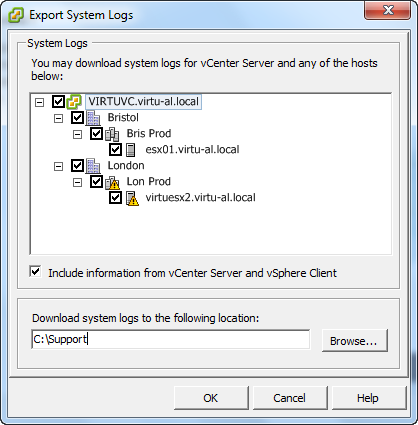
At the moment he was doing this manually every day by using the virtual infrastructure client as can be seen below – you can imagine how long this was taking !

Exporting the logs from the vCenter Client

image

1.  Select the File menu and then Export, Export System Logs…

SNAGHTML3030b74

2.  Select the hosts which you want to download the system logs for and click OK

Continue reading →

Enabling ESX SSH via PowerCLI

Ok, I have been living under a rock a little recently, I have had so much going on that my blog and my hands on time has been suffering, sorry for that.

Whilst delivering a presentation on the new features in vSphere 4.1 – Of which there are tons (should have been 4.5 in my opinion), I came across the ability to be able to enable SSH from the DCUI (Direct Console User Interface).

image

Continue reading →

VMware Session 4: Advanced performance troubleshooting using esxtop

And last in this series of presentations given in London on the 8th October but by no means least is Advanced performance troubleshooting using esxtop, this was an absolutely fantastic presentation by a guy who blew my mind, the best bit was when someone asked him a question and he told the audience member where to find the information on the system and how to decode it from the hex file it was written in – A serious Guru !

Unfortunately there was an issue getting the audio of this session so it looks like we will have to stick with the slide deck but please do not be disappointed as this is 59 deep dive slides on esxtop including some of the new counters only relevant to 4.1, please check it out its great stuff.

Continue reading →

VMware Session 3: PowerCLI & Onyx

Following on in the series of presentations (listed below) given by VMware on the 8th October in London please find below the PowerCLI & Onyx slide deck and MP3 file.

Other presentations given:

VMware Session 1: Exploring VMware APIs

VMware Session 2: vSphere APIs for Performance Monitoring

This presentation focused on PowerCLI and Onyx, they skipped some of the easy stuff that normally goes at the start of a PowerCLI deck mainly because the London crowd is used to me force feeding them PowerCLI on a regular basis !

Its a great deck and a good listen on the MP3, some interesting questions and comments made throughout the deck.

This presentation was given by Vladimir Goranov and Yavor Boychev who are both part of the PowerCLI team. (See if you can spot the mistake on slide 7 Winking smile)

The MP3 file can be downloaded from here and the presentation is embedded below: Continue reading →

VMware Session 2: vSphere APIs for Performance Monitoring

Following my first post located here called ‘Exploring VMware APIs’ which was held on October 8th in London, I have now uploaded the second slide deck and MP3 file.

This time the presentation was on “vSphere APIs for Performance Monitoring”, there were some great tips in here on how to optimise your code and the presenter was fantastic, the kind of guy you could watch present about anything – very theatrical !

This presentation was given by Balaju Parimi and Ravi Soundararajan – make sure you listen to the MP3 which can be downloaded here.

Continue reading →

VMware Session 1: Exploring VMware APIs

On October 8th in London VMware arranged for some of the top GURUs to come to London and give some exclusive presentations on VMware API’s, performance, PowerCLI and Onyx.

It was a great day with around 60-70 attendees, luckily for those of you who didn’t attend we managed to record the session in MP3 format and also get hold of the presentations.

This is session 1 of the day and is entitled “Exploring VMware APIs” by Preetham Gopalaswamy, please make sure you download it and have a listen, there is some really great stuff in here.

Firstly, the below is a video shot on the day which explains more about what we were trying to achieve: Continue reading →

VMware Event – London – 8th Oct – Not to be missed

If you are in London on the 8th October 2010 then you could be in for a treat, VMware are arranging a fantastic event, well worth the visit and best of all its free !

The event is called: Managing vSphere in large environments using APIs and PowerCLI

There are limited spaces available so act now or you will miss out, some of the most fantastic minds of VMware will be gracing London with their presence before heading out to VMworld Copenhagen.

Think of this as a taster of the kind of things you can expect from Technology Exchange, the contents are listed below, I would recommend this to any VMware admins who are managing large implementations of vCenter, there will be some great detail in these sessions.

If you would like to attend please send an email to PowerCLIEvent@virtu-al.net with your name and company, this will strictly be on a first come first serve basis as there are limited numbers.

If the API’s are not for you then make sure you read the last session before dismissing this day !

The Agenda of the day is as follows:

Continue reading →

VMware View 4.5 – More PowerShell Cmdlets

Its probably not news to you that VMware have now released View 4.5, just one of the many cool announcements made at VMworld 2010 – San Francisco.

Did you know however that View now has some PowerShell cmdlets ? – Yeah that’s right.

The Good

I think its great that VMware are putting so much time and effort into PowerShell and giving windows admins a great tool to manage their VMware infrastructure with, one thing I always tell anyone who will listen is that PowerShell is “the glue” that sits in between your applications to enable a common programmatic interface allowing you to glue all these applications together to give you the end results you need, whether it be deploying a VM and then installing Windows and then installing Exchange and then following on to add the mailboxes and patch the server and even send you an email at the end to say its done or simply just adding an “A host” record to a DNS server for a VMHost after installing ESX and patching the host using the Update manager cmdlets.

The possibilities are endless, well as endless as your imagination !

So yes, the point here is that its a great thing that VMware continue to add PowerShell enablement to their apps giving us the freedom to automate them.

With View 4.5 we are given 45 cmdlets to manage our View environment, these are listed below: Continue reading →