
We have all seen the message of the day setting which allows you to alter what you would like to tell your colleagues today and other than the normal fun type messages I have never seen it put to good use. (Yes I know this is used to tell people that a host is being managed by a VI).
So you could stick with your normal messages….

Or you could put it to use, how would you like a vExpert, no a vGuru, no a vGod to update your Message of the Day, giving you tips and help each day and helping you along the path to virtual enlightenment ? Well now you can.
Jason Boche has recently announced his vCalendar which is a great daily calendar with tip for each day, there is also a blog widget and netvibes or Google widget for this too, so my script takes these wonderful daily tips and adds them to a place we all visit on a daily basis…. The Virtual Infrastructure Client.
Now you can be taught a daily message by the vMan himself.
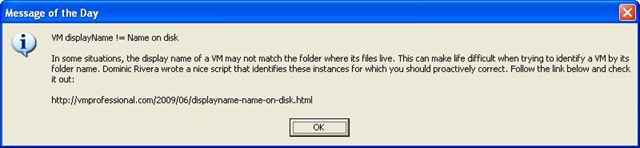
The script should work in most cases apart from those companies that have complex proxy servers. – Hope it works for you !
Don’t forget to set it up as a scheduled task to run at 00:01 every night and update your VI with the next vTip.
Function vTip {
    $proxyAddr = (get-itemproperty 'HKCU:\Software\Microsoft\Windows\CurrentVersion\Internet Settings').ProxyServer
    $proxy = new-object System.Net.WebProxy
    $proxy.Address = $proxyAddr
    $proxy.useDefaultCredentials = $true

    $webClient = New-Object System.Net.WebClient
    $webadd = "http://www.printedowl.com/CalendarNetvibeGadget.aspx?id=boche&render=1"
    $webClient.proxy = $proxy

    trap [System.Management.Automation.MethodInvocationException]{ Continue}

    $RAWTip = $webClient.DownloadString($webadd)

    if ($RAWTip -eq $null){
        $DailyTip = $null
    }
    Else {
        $DailyTip = $RAWTip -replace "[`r`n]",'' -replace '^.*<!-- google_ad_section_start -->(.*)<!-- google_ad_section_end -->.*$','$1'
    }

    $DailyTip

}

$Message = VTip

# Dont forget to change the below line to connect to your VI
Connect-VIServer MYVISERVER

$UpdateMessage = Get-View -Id SessionManager
$UpdateMessage.UpdateServiceMessage($message)
Or if your like me and do most of your work from the PowerCLI console you could remove the last 5 lines and add it to your PowerShell profile:

Alan,
How would I use your script to create my own updates. What format does the updates have to be in.
Any help \ advice would be appreciated.
Thanks
Pingback: vCalendar Launch - boche.net – VMware Virtualization Evangelist
You are awesome Alan! Thank you for updating this script!!!!!
Jas
@Dave
Yes it looks like it has, I will take a look at this.
I want to say – thank you for this!,
has something changed to the page, all this script produces now is the google ad publication id string. pub-8048403148
@Ryan Melton
I agree that would be nice, but unfortunatly its an all or nothing in the VIC !
it would be nice if you could target the message of the day based on the vCenter role.
Example
Virtual Center Administrator role would get info from Jason’s vCalendar.
Virtual Machine User role may get a message saying “Contact Help Desk @ 555-1234 for assistance”
@Jason Boche
Thanks Jason, Glad you like it and thanks for putting in the hard work.
What a great idea! This is amazing! I’ll add this to my vCalendar page as an option.
@LucD
@Tim
Thanks guys
Excellent, heading into the office to play with this immediately!
Brilliant idea !