
Recently VMware are adding everything into vCenter to be centrally managed, apart from my PowerCLI prompt I think the vSphere Client is the second most launched application on my computer !
Now wouldn’t it be useful if you could add your other management interfaces into the vCenter Client, even if the vendor hasn’t created a plugin…
One App to rule them all, One App to find them,
One App to bring them all and in the vSphere Client bind them.
Sorry, couldn’t resist it.
 Now with my simple script you can fill out a few text fields and instantly add any URL whether its a local file or on a web server, it can be added to your local vSphere Client.
My “PS Local Plugin Creator” script will add the plugin to your local vSphere Client only and does not touch the vCenter server itself, mainly because I wanted to use it as a client only extension.
I think the app is pretty straight forward and needs no further instructions.
Some useful examples of this are below:
Instant access to VMware Documentation

vFoglight
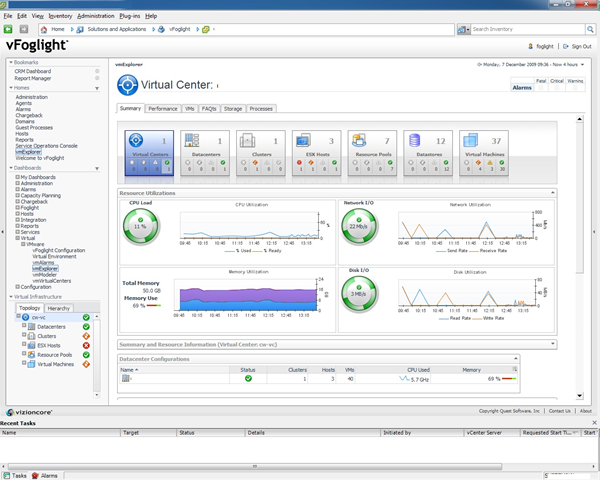
Veeam Backup

VMware View

Thanks to Eric, Barry and Luc for testing the app. Thanks also to the guys at xtravirt for there help.
Did anyone come up with an SSH plugin? Like so I can click on my VM and then open an SSH, or better yet a VNC connection to a Linux VM? I’ve been searching around for addons/plugins like this but none work (the RDP one doesn’t work if you have more then one IP bound to the host ) and the VNC one I found is only for VC 2.5. doesn’t work in 4.1.
How do you add the icon? isn’t working in 4.1 for me 🙁
Cool utility.
Wait for version with multiply items.
Alan,
I am trying to create a plugin for SSH on VSphere client 4.1. Is it possible to create using this plugin creator.
I just gave a shot but it errored out saying “Sorry your Virtual Infrastructure Client Folder could not be found, please let Virtu-Al know: contact@virtu-al”. The reason is VSphere client is installed on D drive and not on C (Systems Drive).
@Forbes,
Yeah I am working on a more advanced one (when I get time) will also add an icon etc, easy enough.
Great tool Alan.
Is there anyway you could add an “all” option to the location field or a tick box above it, which creates an xml file for every view?
Love it,
Forbes.
Pingback: Jase's Place » Iomega StorCenter Local Plugin for vSphere
C’est excellent Alan,
Always at the edge… Genious…!
Thanks to you..
Vladan
@Virtu-Al
You mean a Galaxy.
A good thing also is the ability to choose multiple tab
Replace list by checkbox and add a small loop in the code
Many thanks’ Santa-Al
@Ph Koenig
Now that is the golden question, which I am planning to look up, if we could then it would open up a whole new world !
Pingback: Virt-Al Local Plugin Creator « powercli.co.uk
very useful.
Silly additional question … can we add a reference to an object in the URL ??
Sample : http://myapplicationurl/#TheSelectedVmName
I love it! 🙂
Wonderful! Thanks again for a great piece of code!
Al rocks !
Extremely cool – great job Alan !
-Pablo
Pingback: vSphere Client Local Plugin Creator by Alan Renouf « Virtualised Reality
Alan i _LOVE_ this!! Thank you.
Simon
Pingback: uberVU - social comments