
With vSphere introduced some new maximum’s which we not only have to memorise for the exams but also have to keep in mind when designing and using your infrastructure.
In the back of your mind when adding a new host to a cluster you should always be thinking, how many hosts should be in this cluster ? or when adding another LUN to your clustered hosts, how many datastores should I have as a maximum before it starts impacting my performance and how many paths are supported ?
The answer to these questions (in my case anyway) is to use PowerCLI to check them 🙂
I will of course add these to the next version of vCheck so they are automatically checked for but in the meantime here are some quick one-liners to check your infrastructure against the configured maximums for storage, I will add more as I write them:
Virtual machines per volume: 256 Maximum:
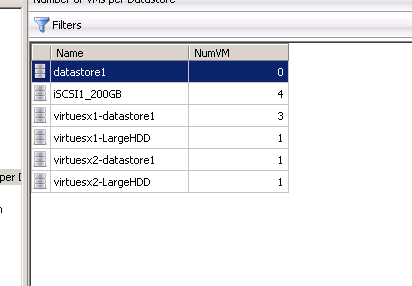
Get-Datastore | Select Name, @{N="NumVM";E={@($_ | Get-VM).Count}} | Sort Name | Out-GridView

Volumes per host: 256 Maximum:
Get-VMHost | Where {$_.State -eq "Connected"} | Select Name, @{N="NumberOfLuns";E={($_ | Get-ScsiLun | Measure-Object).Count}} | Out-GridView

Total paths on a host: 1024 Maximum:
Get-VMHost | Where {$_.State -eq "Connected"} | Select Name, @{N="TotalPaths";E={($_ | Get-ScsiLun | Get-ScsiLunPath | Measure-Object).Count}} | Out-GridView

And of course these will be available in the latest version of my VESI/PowerGUI powerpack as seen below:
Pingback: High Deductible Arrange With HSA Contribution
Oh i see i have Installed Powershell V1. Np Then i Install the newer Version. I tried the script: vm per voumes, the frist one.
Oh I am sorry I didnt mention that this script uses PowerShell V2, Out-Gridview is a new cmdlet for PowerShell V2.
Not sure why it didnt give you a count when you removed that cmdlet though as it should, which example did you try ?
Great Idea, but when i start this scripts @ first Problem is Out-GridView is not regonized as a cmdlet…..
When i delete the Out-GridView then i just see the Names but not the numbers of Luns or VMs…
Pingback: uberVU - social comments