Author Archives: Alan

About Alan

Alan Renouf has a role of Automation Frameworks Product Manager at VMware responsible for providing the architects and operators of the cloud infrastructure with the toolkits/frameworks and command-line interfaces they require to build a fully automated software-defined datacenter. Alan is a frequent blogger at http://blogs.vmware.com/vipowershell and has a personal blog at http://virtu-al.net. You can follow Alan on twitter as @alanrenouf.

PowerCLI Book Preview

If you follow any of my co-authors blogs you will know that our PowerCLI book “Vmware vSphere PowerCLI Reference” is due out imminently, around the end of this month, you of course do not have to wait this long, you can already pre-order the book from any of the sites listed below:

We also started a website which you can keep up to date and download the latest examples from the book or ask questions about scripts in the book, visit it here: PowerCLIBook.com

But what I thought might be nice is a little taster so you know what to find in the book.

Recently when attending the Dutch VMUG, Luc and I gave a presentation, in this presentation we showed more about the book and what to find in it, we even gave some nice video examples of the scripts which you can find in the book, please see below for the slide deck and the videos from our presentation… Continue reading →

Interview with Dimitar Hristov – VMware vSphere PowerCLI Engineering Team

I think I must have missed this interview when I was at VMworld Copenhagen but recently came across this and gave it a quick listen.

John Troyer does a great job interviewing Dimitar Hristov from the PowerCLI engineering team, there is some great information in here to do with getting started and the future of PowerCLI, definitely worth a watch. Continue reading →

PowerCLI Freebies

One question I have been asked more and more recently is how can people get hold of the PowerCLI Poster if they didn’t attend VMworld or one of the VMUGs where VMware and I have been giving them away.

There is of course the PDF version which can be found here but what if you are not fortunate to have a poster sized printer to get this printed at a good size to fill that hole on your wall ?

Its your lucky day !  VMware are now printing and posting these to you FREE OF CHARGE, they have put together a “PowerCLI FAN PACK” which contains the following: Continue reading →

Backing up the ESXi System Image

ESXi is based on a system image, VMware used to call this a firmware but some people found this misleading, most people still refer to it as firmware but in this post I will refer to it as a system image.

The system image is a unified image which is the same whether booting from USB, Hard Disk, PXE or any other media. The logic in the first boot will provide auto configuration based on the kind of installation you have.

One thing to remember about ESXi is that it is memory based, so once booted the system image is entirely loaded into memory, ESXi doesn’t care if the original media disappears after boot, there is no reliance on the boot device for running after booting.

ESXi is essentially made up from a number of tardisks (VM TAR files) or archives, these tardisks are mounted into the empty root filesystem in order of enumeration, one of these is called the state tardisk or state.tgz.

The state tardisk is made up of any file in /etc which is marked as sticky, VMware uses the sticky bit to flag the files which are to be included as part of this tardisk but only if they reside under /etc, these are files like esx.conf, inetd.con, passwd….  These are the files which will be persisted after boot.

Continue reading →

PowerCLI 4.1.1 Poster

Recently VMware updated PowerCLI to version 4.1.1, this includes some cool updates including several new cmdlets and a few fixes behind the scenes to make things run faster and fix type names.

With the new version now comes a new poster, many of you will have already seen the PowerCLI Poster, I know thousands have already been given out at VMworld USA, VMworld Europe and also a limited edition version at the Dutch VMUG.  VMware have done a great job updating this and also asking some of the top users of PowerCLI what should also be included or changed.

If you were unlucky enough not to have one of these above your desk on the wall at the moment then it will only be a matter of time, VMware will soon be hopefully giving you the chance to get one of these posters by ordering them online, I am not sure of the details as yet or how much these will cost (if anything) but will keep you updated as I know more.

For now if you want to check out the latest and greatest poster then please click the image below to download the PDF version or click here to find out the history of this poster and how it has become the masterpiece that it is. Continue reading →

Automated support bundles

I received an email recently from a gentleman asking if it was possible to export the support bundles for each host on a daily basis, this can be useful for not only having an archive of your system logs to help resolve problems and work out when they started but also useful for auditing purposes.

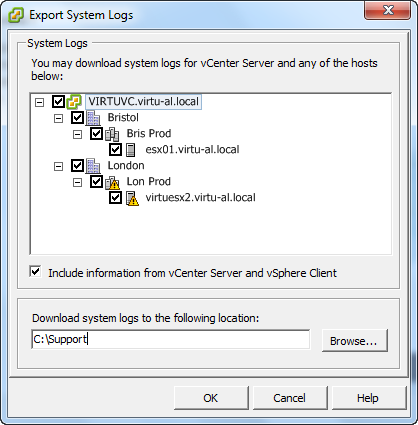
At the moment he was doing this manually every day by using the virtual infrastructure client as can be seen below – you can imagine how long this was taking !

Exporting the logs from the vCenter Client

image

1.  Select the File menu and then Export, Export System Logs…

SNAGHTML3030b74

2.  Select the hosts which you want to download the system logs for and click OK

Continue reading →

Say goodbye to VESI

Goodbye old friendOne of the most frequent questions I get asked at user groups or by people who know I am responsible for the community PowerPack is which product should they use, normally the question is PowerGUI or VESI ?

My standard answer was to always ask them if they preferred trains or turtles but the answer is very easy now.

VESI is the product known as any of the following:

  • VESI
  • Virtualisation EcoShell
  • The Virtualisation EcoShell
  • vEcoShell
  • The Green one
  • The one with the turtle

From now this product is no more, you can still download it at the moment but no further development time will be spent by Vizioncore or Quest on this product, but wait, do not despair, there is good news.

Continue reading →

Out-WordCloud–PowerShell Fun

Whilst producing the presentation for VMworld I created a hypnotic slide which showed every cmdlet in PowerCLI 4.1 in a word cloud type picture, this picture was then rotated and zoomed until the audience believed we had given them a fantastic session – well kind of anyway !

The word cloud i created for that slide was actually created using wordle.net, a website which you can use to create word clouds, each word must be entered on the first page of the site, if a word is entered more than once it will make it bigger than the rest, the more times the bigger the word will be.  Now I could have typed each and every cmdlet into the site and then got it to generate the image for me but where is the fun in that ?

So I created a simple function which you can pass multiple words and it will do it for us, please see below for the code and a short video of me creating a word cloud of all the PowerCLI 4.1 U1 cmdlets:

Just a bit of fun really but someone may find it useful !

Function Out-WordCloud ($Words) {
	$ie = New-Object -com InternetExplorer.Application
	$ie.visible=$true
	$ie.navigate('http://www.wordle.net/create')
	while($ie.ReadyState -ne 4) {start-sleep -m 100}
	$ie.document.getElementById("paste").value=$Words
	$go = $ie.Document.body.getElementsByTagName('BUTTON') | Where {$_.innertext -eq 'GO'}
	$go.click()
}

$Words = Get-Command -Module Vmware.VimAutomation.core | `
 Select -ExpandProperty Name | Out-String

Out-WordCloud $Words

Continue reading →

VMworld Session: PowerCLI is for Administrators!

This post has been a long time coming – but now the PowerCLI book is at last in the final stages of production (you can pre order here) I am finally able to spend a little time updating my blog again, and believe me I have a long list of posts !

So, back in August at VMworld San Francisco and again in October at VMworld Copenhagen my good friend Luc Dekens of Lucd.info and I presented a session called “PowerCLI is for Administrators!”.

Our goal in this session was not to teach people how to use PowerCLI, this is as im sure you know, quite hard to accomplish in 1hr.  Luc and I decided to open peoples minds and show them what could be achieved with PowerShell and PowerCLI, the session took us from the beginning and then started getting more and more advanced showing people that PowerShell really is for the system administrators and not developers.

One thing you should know about this session is that it was actually voted into VMworld by you – the VMware public, this session was not chosen by VMware and was added to a list of sessions which were voted on by VMware users – I would just like to thank you so much for allowing both Luc and I to present this and what is one of the most memorable times of my life (if the wife asks its definitely the kids births though).

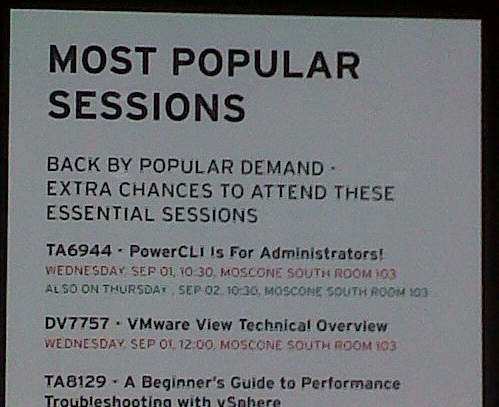
After saying that I found it quite funny that we were one of the most popular sessions at VMworld and were asked to present it three times in San Francisco and twice in Copenhagen, I think the below pictures say it all:

image

Continue reading →

Enabling ESX SSH via PowerCLI

Ok, I have been living under a rock a little recently, I have had so much going on that my blog and my hands on time has been suffering, sorry for that.

Whilst delivering a presentation on the new features in vSphere 4.1 – Of which there are tons (should have been 4.5 in my opinion), I came across the ability to be able to enable SSH from the DCUI (Direct Console User Interface).

image

Continue reading →